Apple introduced gift cards in 2008 with the App Store launch. At first, they were mainly called iTunes gift cards. They were used to buy music, apps, and other digital content. Later, Apple created Apple Store gift cards, which could be used to buy physical products like iPhones. In 2020, Apple combined these two types into a single card called the Apple Gift Card. This new card could be used for both digital content and physical products, making it much easier for users. Over time, Apple has become very popular and so has its gift cards. And with popularity confusion over different things has also increased, like redeeming gift cards or where to buy them. From choosing the right place to buy Apple cards to adding its balance to your account, every step needs to be done the right way.
In this blog, we will guide you through everything you need to know about Apple Gift Cards. Let's start!
📝 What Are Apple Gift Cards?
Have you got an Apple gift card as a gift but don't know what it is or how to use it? Let's understand it
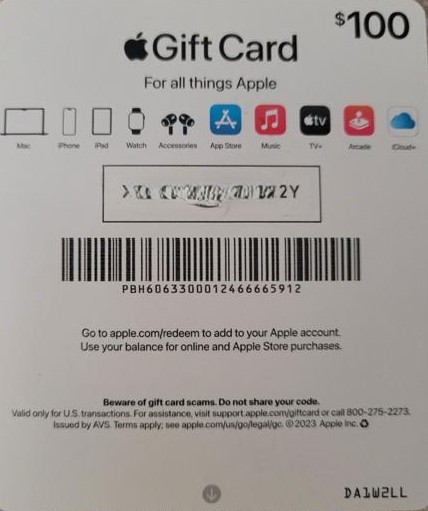
An Apple gift card is a prepaid card from Apple. It enables you to buy different Apple products and subscriptions without using a bank card. One Apple card can work for many Apple services like purchasing movies, games, apps and subscriptions. To purchase anything from Apple's website, you'll need the card code to redeem its value. There are many uses of Apple gift cards rather than just using them to purchase products & services.
- They can be used as the perfect gifting option for the family, friends & even yourself.
- You can convert an Apple gift card anytime for immediate cash.
📝 Types of Apple Gift Cards
The types of Apple gift cards are based on its older and latest version. Getting confused? Let us make it clear for you;
⬅️ Older Version of Apple gift Card
App Store & iTunes Gift Cards
This type of Apple gift card was specifically designed only for digital purchases. This card is blue in color with a pattern on it.
Apple Store Gift Card
This type comes in different solid colors, like gold, silver, & grey. This was designed only for the purchase of physical products & accessories at the Apple Store.
➡️ Latest Version of Apple Gift Card
The current type of Apple gift card comes with a versatile option where you can buy both digital content & physical products. This latest & unified type of Apple card features a colorful Apple logo.
Different Formats of Apple Gift Cards
Apple gift cards come in two formats; physical & digital gift cards.
Physical gift cards come in the form of plastic. They can be purchased from a store or can be delivered through mail. These cards come with a scratched off code in silver coating.
Digital gift cards are delivered instantly to the recipient. These are the best options for last minute gifting. The rate of digital gift cards is lesser as compared to physical gift cards.
📝 Where to Buy Apple Gift Cards
Online Retailers
1. The safest and secure way to buy Apple gift cards is from Apple's official website. You can buy an Apple card of any denomination. It also allows the customization option (like adding personal message).
2. You can also buy Apple gift cards from popular & authorized e-commerce platforms like Amazon. But make sure that you are buying from their official websites and not from third party resellers.
Physical Stores
1. For those users who are looking for a tangible gift card, they can also purchase it from physical stores like Apple Retail stores.
2. There are many hypermarkets & supermarkets from where you can also buy Apple gift cards. Make sure to check the card's condition, region restriction and card's activation status with the store retailer.
📝 How to Check Apple Gift Card Balance
Checking Apple gift card balance is very important if you are using an Apple gift card on a regular basis. You can verify your gift card balance before & after redemption. But remember that the steps for checking Apple's card balance before & after redemption are totally different. Here's how;
Checking Apple's Card Balance Without Redeeming it
The first question that usually pops up is that "Can I check Apple gift card balance without redeeming"?. The answer is Yes. You can check it easily by visiting Apple's official balance checker page
https://support.apple.com/en-ae/108111
Checking Apple Gift Card Balance After Redemption
If you have already redeemed your card, then checking balance is super-easy. The steps for verifying the balance on different Apple devices like iPhone, iPad, Mac, & Windows are quite the same. Want a step by step guide?? Click on the link to get detailed information
📝 Can I Share Apple Gift Balance With Anyone?
The answer is NO. You cannot share your Apple gift card balance with anyone. The balance is only linked & tied with your Apple ID and cannot be transferred to any other account. However, there are ways to gift an Apple card to someone;
1. If you have an unused gift card, you can share the code with your loved ones and they will redeem the Apple gift card code by themselves.
2. You can also buy a new card online or physical store for someone. You can even customize these gift cards according to the occasion (like a birthday event)
📝 How to Redeem Apple gift cards on different devices
Redeeming an Apple Gift Card is quick and easy on any Apple device. You can do it using your iPhone, iPad, Mac, or even a Windows PC. Open the App Store or iTunes and sign in with your Apple ID. Choose the Redeem Gift Card or Code option. Scan the code or enter it manually. Once redeemed, the balance is added to your Apple ID instantly.
📝 How to Sell Apple Gift Cards for Cash Online
The safest & fastest way to convert Apple gift cards into cash is using reputable & verified gift card trading platforms. And that's where Cardsoon comes in. Cardsoon is a safe & trusted gift card trading app where you can sell your gift cards without any hidden charges. Here is a quick guide to sell your Apple gift card on Cardsoon;
1. Download the Cardsoon app. Log in to your app or register yourself if you are not an existing user.
2. On the dashboard, scroll down and find the "Sell gift card" section, click on "Apple
3. On the "Sell Gift Card" page, you can see multiple steps to fill in. These are the gift card details. As we have mentioned earlier , Apple gift cards come in two formats; Physical & Digital. Select the card you have.
4. Select the "currency" & "face value". The app will show you the latest gift card. You'll get the same rate after completing your trade. But this rate can also change 😮 but how? You can also increase your final rate by using reward features on Cardsoon.
5. If you have earned extra money, you can add coupons & coins from the same page.
6. Upload your gift card image. On Cardsoon, you'll also find an "Image Upload Guide". Click on that and see how you should upload it.
7. Lastly, click on "Start Trade" and get your cash right away in Cardsoon wallet. You can transfer your money to your bank account anytime.
📝 Restrictions & Limitations for Apple Gift Cards
Following are some restrictions & limitations on Apple gift cards;
1. Apple gift cards are region locked. These can be redeemed only in the country where purchased.
2. You cannot transfer Apple gift card balance to any other account.
3. It cannot be used to buy other Apple gift cards.
4. Once you add the gift card balance to your Apple ID, your gift card will become inactive. You can then use your added balance to make purchases.
5. Apple gift cards cannot be used to pay utility bills, or government fees.
📝How to Avoid Apple Gift Card Scams
Follow these points to protect yourself from Apple gift card scams;
Never Share Your Gift Card Code: Make sure that you never share your gift card code with anyone. The code is the only way to redeem gift cards & if you have shared that, you will lose your gift card value
Purchase Gift Cards from Reputable Retailer: Never buy gift cards from unauthorized websites or any online auction site as they sell stolen and fake gift cards.
Keep Evidence of Purchase: Always keep your gift card purchase receipt & picture. In case of any scam, this information is useful to report the scam immediately. Note: If you believe that you have been scammed or targeted by the scammer, then contact Apple Support immediately and report the scam as soon as possible.
FAQ's
- What are the different types of Apple gift cards?
There are different types of Apple gift cards;
1. iTunes gift cards (for digital purchases)
2. Apple App Store Card (to purchase physical products)
3. Apple Gift card (latest version of card that can be used for both physical & digital purchases).
2. Do Apple gift cards expire?
No, Apple gift cards never expire. You can use your balance anytime you want.
3. Can I share Apple gift card balance with anyone?
No, you cannot share your Apple gift card balance with anyone.
4. Where to Buy Apple Gift Cards?
You can buy an Apple gift card from Apple's official website or Apple physical store. If you are buying it from any retailer (store or online retailer), make sure that they are trusted.
5. Can I sell Apple gift cards for cash?
Yes, you can trade your gift cards for cash on Cardsoon. The steps have been explained in detail in the blog.