Airtel is one of Nigeria's most widely used networks, and buying data on Airtel is something most users do regularly. Whether you're topping up for work, streaming, or staying connected, knowing the right method saves you time. This guide walks you through every way to buy data on Airtel in Nigeria, including a smart option most people haven't tried yet.
How to Buy Data on Airtel in Nigeria?
There are multiple ways to buy data on Airtel in Nigeria. Each of these methods works depending on what's convenient for you at that moment. Whether you prefer USSD codes, an app, or a smarter alternative, here's a full breakdown of all the methods to buy data from Airtel in Nigeria.
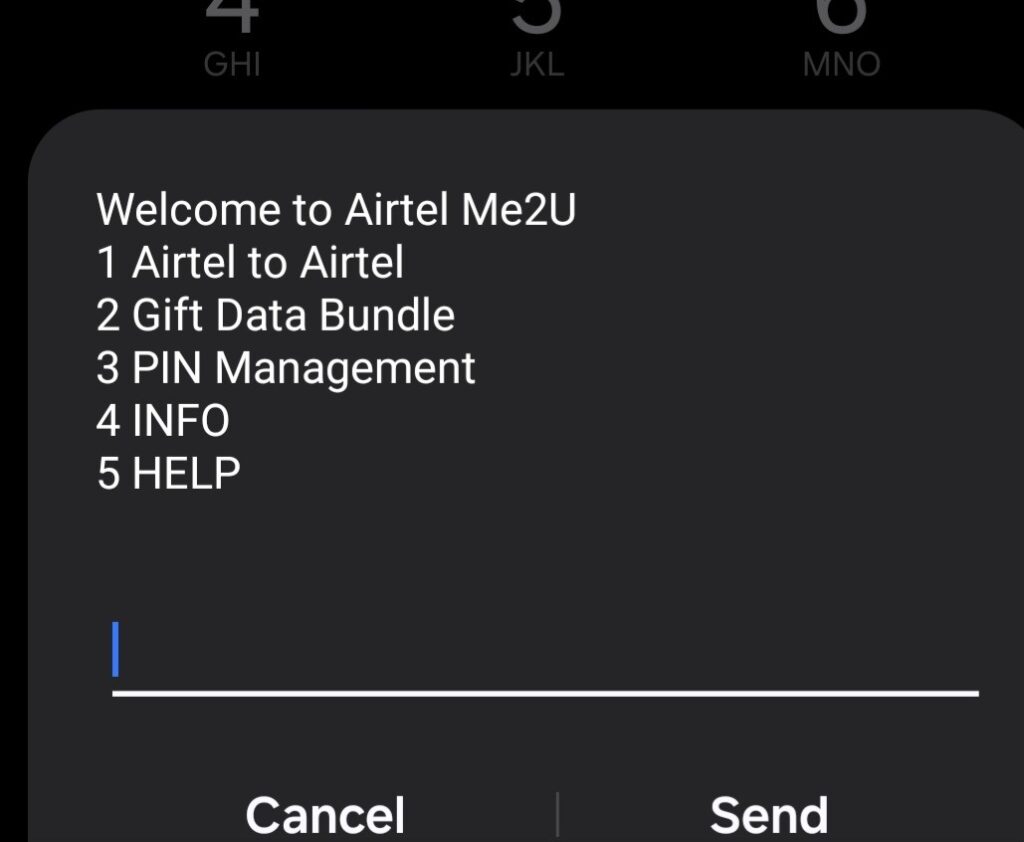
Code to Buy Data on Airtel (USSD Method)
The easiest and most widely used method to buy data on Airtel is through a USSD code. You don't need internet access or a smartphone. You just need your Airtel SIM and your phone's dialer.
The code to buy data on Airtel is *312#. Here's how to use it:
1. Dial *312# on your Airtel line
2. A menu will appear — select your preferred plan category (Daily, Weekly, Monthly, etc.)
3. Choose the specific plan you want
4. Confirm the purchase
Your data activates almost immediately after confirmation. This method works on all phones, including basic keypad devices, which makes it the most accessible option for most users. Once you dial the code, the menu also shows all current plans and prices, so you can compare options before committing.
Note: Make sure you have sufficient airtime balance before subscribing, as the cost will be deducted directly from your airtime.
How to Buy Data on Airtel via the My Airtel App?
If you'd rather manage things from an app, the My Airtel app makes it simple to buy data on Airtel without dialing any code. It's also the more flexible option since it supports debit card payments alongside airtime.
Steps to buy Airtel data using the app:
1. Download the My Airtel app from Google Play Store or Apple App Store
2. Log in with your Airtel number
3. Tap "Buy Data" from the home screen
4. Browse and select a plan that works for you
5. Choose your payment method and confirm
Beyond buying data, the app lets you track your usage in real time, manage your account, set up auto-renewals, and even buy data for another Airtel number, all without dialing a single code. If you buy data on Airtel frequently, this is the option worth setting up.
How to Buy Data on Airtel Data from Airtel Website?
For users on desktop or those who prefer not to use an app, the Airtel website is another working option to buy data on Airtel.
1. Visit airtel.com.ng
2. Log in or sign up with your Airtel number
3. Go to the Data section
4. Select your preferred plan and complete payment
This method supports debit card payments and is particularly useful when you're buying data for a different line or managing multiple numbers from one place. It gives you the same access as the app, just through a browser.
How to Buy Data on Airtel from Cardsoon?
This is a method most people haven't tried, and once you do, it changes the way you think about unused gift cards.
Cardsoon is a Nigerian gift card trading platform where you can sell gift cards in Nigeria like Amazon, iTunes, Steam, Google Play, and others in exchange for naira. Once you trade your card and your wallet gets funded, you can use that balance to buy data on Airtel directly from the Cardsoon app. No airtime is needed. No bank transfer. Just your gift card wallet.
Here's how it works:
1. Download the Cardsoon app and create a free account
2. Tap "Sell Gift Card" and select the type of card you want to trade
3. Enter the card details and submit — your wallet gets funded almost instantly
4. Navigate to the "Buy Data" section on Cardsoon
5. Select Airtel, pick your plan, and confirm
If you regularly receive gift cards from work bonuses, online gigs, or friends abroad, Cardsoon gives you a direct way to convert them into something useful, like mobile data. It's practical, fast, and doesn't require any airtime in your line.
Now that you know how to buy data on Airtel, the next thing to sort out is how to keep track of the data you've subscribed to.
How to Check Airtel Data Balance After You Buy Data?
After you buy data on Airtel, keeping track of your balance is just as important as the purchase itself. Running out of data mid-task, especially during work calls or important downloads, is avoidable if you check regularly.
Make it a habit to check data and airtime balance on Airtel, soon after a recharge.
Ways to check your Airtel data balance:
• USSD: Dial *323# — you'll get an instant pop-up showing your active bundles and their expiry dates
• My Airtel App: Open the app and your remaining data balance is displayed directly on the home screen
• SMS: Send "STATUS" to 312 and you'll receive a message with your current data details
None of these methods cost you data or airtime, so there's no reason not to check. Once you know your balance is running low, topping up is quick regardless of which method you used to buy data on Airtel in the first place. And if you still have data left but want to help someone else stay connected, Airtel has a simple way to do that too.
How to Share or Gift Data on Airtel in Nigeria?
Once you buy data on Airtel, you're not limited to using it alone. Airtel lets you share your active data bundle with family or friends, as long as they're also on the Airtel network.
To gift data on Airtel in Nigeria:
1. Dial *312# on your Airtel line
2. Select "Share Data" from the menu
3. Enter the recipient's Airtel number
4. Choose how much data to share and confirm using your PIN
A few things to keep in mind before you share:
• Data sharing only works between Airtel lines — cross-network transfers are not supported
• You can only share from an active paid data bundle, not bonus or promotional data
• Both numbers must be active Airtel lines
• Your default sharing PIN is 1234 — it's recommended to change this immediately for security purposes
• There are minimum and maximum transfer limits depending on your current plan
It's one of the most convenient features Airtel offers, and it saves you the trouble of sending money back and forth just to keep someone connected.
Conclusion
Knowing how to buy data on Airtel in Nigeria gives you more control over how you stay connected and now you have every option laid out clearly. From the *312# code to the My Airtel app, and Cardsoon, there's a method that fits every situation.
If you have unused gift cards sitting around, don't let them go to waste. Download the Cardsoon app, trade your cards for naira, and use your wallet balance to buy Airtel data in minutes. It's one of the smartest moves you can make as an Airtel user in Nigeria.
Download Cardsoon today and turn your gift cards into data.
FAQs
1. What is the code to buy data on Airtel in Nigeria?
The current code to buy data on Airtel is *312#. This is the NCC-harmonized universal USSD code for all Airtel data subscriptions in Nigeria. Simply dial it, follow the on-screen menu, select your preferred plan, and confirm. It works on all phones including basic keypad devices, and no internet connection is required.
2. What happened to the old *141# code for Airtel data?
The *141# code is no longer active for data subscriptions. Following the Nigerian Communications Commission (NCC) directive to harmonize USSD codes across all networks, the universal code is now *312#. Using the old code may redirect you or return an error, so make sure you're using the updated one.
3. How do I check my Airtel data balance?
Dial *323# to check your Airtel data balance instantly. You can also check through the My Airtel app, where your remaining data and expiry date are visible on the home screen, or by sending "STATUS" to 312 via SMS. All three methods are free and don't consume airtime or data.
4. Can I share data on Airtel with someone on a different network?
No. Airtel data sharing only works between Airtel lines. Cross-network data transfers are not supported on any Nigerian telecom. If you want to help someone on MTN, Glo, or 9mobile stay connected, you'd need to send airtime or buy data through a third-party platform on their behalf.
5. Can I buy Airtel data for someone else's number?
Yes. Through the My Airtel app and the Airtel website, you can buy data for another Airtel line. On the app, select the option to top up a different number, enter the recipient's details, choose a plan, and complete the payment. The data gets credited to the other number immediately.
6. What happens if I buy data on Airtel and it doesn't activate?
Start by dialing *323# to confirm your balance. If the data doesn't appear, restart your phone and check again after a few minutes. If the issue persists, contact Airtel customer care by calling 111 or through the support section on the My Airtel app. Keep your transaction reference handy when